How to Update Facebook without Using Facebook
hellotxt and Ping.fm both introduced features that let Facebook administrators update Facebook Pages.

How to Schedule Facebook Messages
Sendible lets you schedule Facebook messages ahead of time so you can send messages to your friends, customers or colleagues in the future.

How to "Friend" Someone on Facebook & Hide It From Your Status Updates
A short tutorial on Makeuseof to guide you how to hide Facebook status updates and keep that fact confined to your closer friends.

How to Create a Photo Collage Using Pictures of Your Facebook Friends
Click on Friends tab. Proceed to More tab. From "Choose an option" dropdown, choose any of the dashes "—" . Your Facebook friends collage is right on your computer screen.

How to Know When Facebook Friends Secretly Delete or Block You
This service has been discontinued. X-Friends is a unique tool for tracking friends that disappear from Facebook.

How to Display Selected Pictures Only on your Facebook Profile Page
A little-known feature in Facebook that lets you decide who shows up in that Friends box. Click that "edit" pencil in your Friends box and type the names of your best friends in the box that says "Always show these friends"

How to Remove Facebook Advertisements
This Greasemonkey script – Facebook: Cleaner removes many of the annoying ads and updates that unavoidably appear on your Facebook pages.

How to Syncs Photos of Facebook Friends with Contacts in Microsoft Outlook
OutSync is a free Windows application that syncs photos of your Facebook friends with matching contacts in Microsoft Outlook. It allows you to select which contacts are updated. So you can update all contacts at once or just a few at a time.

How to Display Facebook Statuses on WordPress Blog
The following method make use of Facebook status feed and WordPress RSS widget to display Facebook Statuses on WordPress blog.. It will also work for self-host WordPress blogs.

How to Post Your Blog Posts to Your Facebook Wall Automatically
Wordbook allows you to cross-post your blog posts to your Facebook Wall. Your Facebook “Boxes” tab will show your most recent blog posts.

How to Access Facebook Chat on Desktop
Gabtastik and digsby let you keep Facebook chat sessions open on your Windows desktop outside of your regular web browser, using minimal screen real estate and system memory.

How to Create Quiz on Facebook Easily
LOLapps provides quiz creator that can be employed to conjure up these popular personality quizzes that are so widespread in Facebook.

How to Hide Your Online Status on Facebook Chat from Select Contacts
Facebook has integrated friends list with Chat and you can also choose which of these list members get to see you online.

How to Get Facebook Updates on Email
NutshellMail consolidates your Facebook accounts through the inbox you use the most.

How to Update Facebook Status from Firefox
FireStatus is a status update utility for multiple social networks, including FaceBook.

How to Get Facebook on Your Desktop
Seesmic Desktop, Facebooker, Xobni, Facebook Sidebar Gadget, Scrapboy and Facebook AIR application are desktop applications that allows you interact with your stream just as you would on Facebook, but without the browser.

How to Delete, Cancel and Terminate Facebook Account and Profile
A simple guide to terminate, delete or cancel Facebook account, together with the Facebook profile easily.

Showing posts with label NEW TRICKS. Show all posts
Showing posts with label NEW TRICKS. Show all posts
by
·
No comments:
NEW TRICK IN FB
by
·
No comments:
Get Free And Fast Likes In Facebook - 100% Working Auto Like Trick
Hi, Now i share a working trick for Facebook users. Increase your Facebook status likes with this trick. This is 100% working for me. Just try it and increase your status likes.


- Go to Facebook subscribe and Enable subscribers.
- After enabling subscribing option go to http://www.likelo.com.
- Get your access token by clicking on 'click here' on the site's homepage.
- After you click on 'click here' you might be asked to allow permissions to a facebook application.
- After installing copy the url of that page which is your Access Token.
- Paste access token in http://www.likelo.com homepage and click on submit button.
- It will automaticaly re-direct to a page and select a facebook status and submit it.
- Done
by
·
No comments:
new tricks
Facebook being one of the most popular social networking site, comes with various Facebook tips and tricks. Here I have compiled a list of fb tricks that you would like to try on your Facebook profile. These below mentioned Facebook tips are evergreen and we will keep updating this Facebook tips and tricks post, as soon as we get out hands on more such fb tricks.
Facebook, widely known as FB, is one of the most popular social networking sites people of all ages are addicted to these days. It has millions of subscribers to date. Unfortunately, not all of them really know how to navigate and make use of all the cool apps that Facebook offers. What a waste! If you’re one of these FB-newbies, you need not worry any more. This post will help you to make most out of your Facebook profile. There are not some Facebook secret tips but most of these Facebook hacks and tips are uknown to many Fb users.
 |
| facebookhongama4u.blogspot.in |
Useful Fb tricks for Enhanced Facebook experience:
1. Appear Online Only to Selected Friends:
Facebook chat is one of the coolest and most useful features in FB. My dilemma, however, was how to limit the number of people I chat with every time I log in. I certainly can’t accommodate them all but I don’t want them to feel like I’m rejecting them when I don’t send them a reply. I didn’t know back then that it is possible to appear online only to a few selected friends. A friend of mine actually gave me this idea which I’m sure would be of use to you, too.Here’s how to do it:
Go to Chat found at the lower right side of the page and then, click on Friends List. A small window will appear where you can type and create a new list. You could name it anything you want. In this example I named it “Blocklist”. On your newly created list, select and start dragging those names that you wish to block. Then set your status to appear offline to this particular group of friends. With this, you now appear completely invisible to them. Try it now.


4. Upload Photos and Videos Using Your Mobile Phone:
The last time I went to Bantayan Island, I met this cool new friend who has uploaded his fresh photos and videos directly from his Blackberry Phone onto his Facebook account instantaneously. Interestingly, this process is quite simple and you can do it on all smartphones. Just visit this linkand learn how you could start sharing your videos and photos via phone and email.
Here’s how: Press Up, Up, Down, Down, Left, Right, Left, Right, B, A, Enter key then press up & down.
Now, just in case it doesn’t work on your first try, try reloading your page again by pressing F5 and repeat the process.
7. Quickly Upload Photos from Picasa Application to Facebook:
It was a great challenge for me to find an alternative photo hosting application, an application that would really work to my liking. Picasa happens to be it. I find this application to be useful in sharing and organizing photos of various events like reunions and parties. It has plenty of exciting features; one of them is the ability to upload photos directly to your FB account. Here’s what you need to do to download and install PICASA version 2 or 3:- Click here to download.
- Once the installation is complete, click Picasa application here to install the plugin.
- Next, add the new Facebook button to your Picasa.


8. Use Facebook search like a pro:
Have you experienced looking for someone in Facebook with such difficulty? If yes, then perhaps you might want to try using the Search Box. This is a powerful tool that can help you find your old friends, celebrities, organizations, or your favorite band with no difficulty. Go ahead and be like a pro – click here to learn how.9. Facebook flip status updates:
Are you in the mood to have a little fun? Try flipping your FB status upside down. I’m sure your friends will be tilting their heads too trying to read your message. Ain’t that funny? It sure is! :) Go ahead and flip your Facebook status now. Click here.10 : Changing fonts on Facebook status:
And I’m saving the best for the last. By default your status update have only one font, but you can always use 3rd party service to change the font of your status update. Here is a cool website which you can use to change font for your Facebook status updates.
I hope you have enjoyed all Fb tricks mentioned above. We will keep sharing more cool Facebook tips in future, don’t forget to join us on Facebook.
by
·
No comments:
Retrieve Deleted Facebook Messages,Photos and Videos
Hey guys apologize for not updating Smarttricks with Fresh Content Regularly in Recent times. But there is a Good News, because i am back with yet another Facebook Trick. Today we will see How to Recover deleted facebook messages,Photos and Videos and much more on facebook.
Basically its a Facebook Feature which not many people are aware of and hence i will be writing this tutorial to let you guys know about this amazing feature/Trick that Facebook Provides.

Many a times We Delete Messages,Photos or Vidoes from our profile which is not intentional but once we do , we can not undo it. and its gone forever.
But wait, There is a saying: Nothing is Lost, until MOM can’t find it, Likewise in this case even if you delete anything from your facebook account, you can get it back. Facebook have all your data in their archive which you can download too.
Step 1: First of all,You will have to Click here to open Facebook General account Settings.
Step 2: Once you open your general settings, you will see Download a Copy of your Facebook Data, So click on it to. Step 3: On the Next page you will see a Download Archive Button, Click on it and you will be prompt to enter your Password to Continue, This is a Security Step by Facebook.
Step 4: After entering your Facebook Password, Click on Submit, On the next screen you will be shown that the download link for your data will be sent to your email id which you used to create your facebook account.
Step 5: Wait for Few Minutes, check your mail. You will see a mail from facebook in your Inbox with Downloading link ready for you to download all your data.

Step 6: Now After downloading the file. Unzip it and open the folder where you will find your messages, photos, vidoes. Pokes, Friend list etc.
The Files will be in .html format so you will have to double click on the file and select your Favourite Browser to open the file, the File will open up in your browser where you will have access to all your data..
I Hope this guide will help someone or other who didn’t already know that you can actually Retrieve Deleted Facebook Messages,Photos and Videos. Don’t forget to Share it with your friends if you like it and you may even Subscribe for New post, to get directly in your mail inbox.
Basically its a Facebook Feature which not many people are aware of and hence i will be writing this tutorial to let you guys know about this amazing feature/Trick that Facebook Provides.
Many a times We Delete Messages,Photos or Vidoes from our profile which is not intentional but once we do , we can not undo it. and its gone forever.
But wait, There is a saying: Nothing is Lost, until MOM can’t find it, Likewise in this case even if you delete anything from your facebook account, you can get it back. Facebook have all your data in their archive which you can download too.
Retrieve Deleted Facebook Messages,Photos and Videos
Follow the Below simple steps to Know how you can get back and have access to your deleted messages, photos,Videos and all other data of your facebook profile.Step 1: First of all,You will have to Click here to open Facebook General account Settings.
Step 4: After entering your Facebook Password, Click on Submit, On the next screen you will be shown that the download link for your data will be sent to your email id which you used to create your facebook account.
Step 5: Wait for Few Minutes, check your mail. You will see a mail from facebook in your Inbox with Downloading link ready for you to download all your data.
Step 6: Now After downloading the file. Unzip it and open the folder where you will find your messages, photos, vidoes. Pokes, Friend list etc.
The Files will be in .html format so you will have to double click on the file and select your Favourite Browser to open the file, the File will open up in your browser where you will have access to all your data..
I Hope this guide will help someone or other who didn’t already know that you can actually Retrieve Deleted Facebook Messages,Photos and Videos. Don’t forget to Share it with your friends if you like it and you may even Subscribe for New post, to get directly in your mail inbox.
by
·
No comments:
Latest Facebook Tips, Tricks That Your Might Not Know
Among all the social networks available now, Facebook is the most interesting social network. Not only it lets you to chat people, connect to them, comment, likes, create groups etc. but it is hottest portal for many tech geeks also due to lots of Facebook Tips and Tricks available now.
There are lots of Facebook tips and tricks available to make you smarter than your friends on Facebook. We have provided over 50 Facebook Tips and Tricks from our website and we’re coming up with more and more tricks for you. In case, you are finding it hard to explore all the Facebook Tricks available on our website, we have compiled this all in one article that will serve you all the Facebook Tips and Tricks we have provided through our website till now.
So, lets move on and start learning these amazing Facebook Tricks.

35+ Most Wanted Facebook Tips/Tricks
Read this article to learn over 35 most amazing Facebook tricks, out of which, many Facebook tricks are unknown to you. We have written this article earlier and it is helping many Facebook users to learn amazing Facebook Tips and Tricks and get popular on Facebook.
Read Here: 35+ Amazing Facebook Tips & Tricks
Create Stylish Facebook Status
Have you get bored of same fonts style, design, size and color Facebook is using from 10 years? Then this Facebook trick is for you. Learn Facebook tip to know how you can post stylish statuses with many stylish text effects, decorations, ASCII arts, variety of symbols and more.
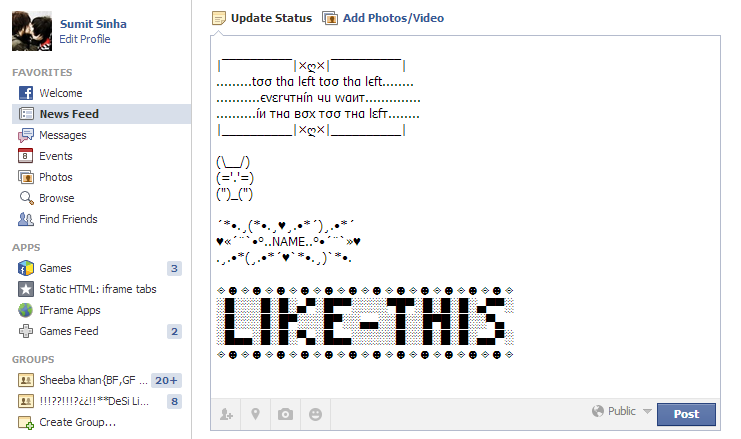
Learn this Facebook Trick here
Activate Two Facebook Profile Photo At Same Time
Yes! you can activate two profile photos on your Facebook at the same time. One will appear on your Timeline and other, at all other places on Facebook. To learn “how to do this”, read out this Facebook trick.

Learn this Facebook Trick Here
Add Custom Facebook Chat Stickers and Smileys
Bored of using same Facebook chat emoticons/smileys and stickers? Well, its time for a change. Read this Facebook trick and get access to over 3400 new Facebook chat emoticons and smileys to use in chat that includes lates memes, troll faces, grumpy cat and more.

Read this Facebook Trick Here
Remove Facebook Timeline Anytime
Do you want to remove that complicated Facebook timeline? Do you want to get your simple Facebook wall back? Then, learn this Facebook trick. It will tell you how you can remove your Facebook timeline. It still works and you can remove your Facebook timeline anytime.

Learn this Facebook Trick Here
Increase Fanpage “Talking About” by 275%
Do you owns a Facebook Fanpage that have large number of fans but not getting enough users’/fans’ attention? Well, the page is generally considered as “dead” but we have find the way to make dead page alive almost instantly. Know this Facebook trick to increase your fanpage’s users attention (likes, comments, shares, reach, etc_ by 275%

Learn this Facebook Trick Here
Upload Any Picture in High Quality on Facebook
You might have seen that when you upload a high-quality image on Facebook, it make the photo look worse by decreasing its quality. So, don’t let Facebook to decrease quality of your photos, learn this Facebook trick to know how you can upload any image in “high quality” or at least its original quality on Facebook.

Learn this Facebook Trick Here
Download Your Facebook Lookback Video
In the special occassion of 10th birthday of Facebook (this year), Facebook gifted all its users a special Lookback video of their profiles. The lookback video is very attractive and available to you at facebook.com/lookback. The video is not available to download through any video downloader. So this Facebook trick is telling some ways by which you can get your Facebook lookback video.

Learn this Facebook Trick Here
Contact Facebook Team Directly
Is something happened because of which you want to contact Facebook? Or, are you just getting curious to talk Facebook team? Well, then read this article. It includes all possible ways to contact Facebook Team. You can email them, call and even send mail to postal address to.

Learn this Facebook trick Here
Create Mosiac Posters of Your Facebook Friends
Do you want to get a mosiac poster created by your superb Facebook friends? Well, if so, know this Facebook trick. It will tell you (step-by-step) that how you can create mosiac poster of different shape and sizes of your Facebook friends.

Learn this Facebook Trick Here
Top 30 Most Addictive Facebook Games
Facebook contains thousands of free games to play. Not all are interesting so we have compiled a list for Facebook users showcasing top 30 most addictive Facebook games that you can start playing right now to make your Facebook more interesting to you.

Know Top 30 Facebook Games
Top 10 Romantic Facebook Fanpage
This article should be considered Facebook tips (and not trick) for new users to Facebook. We have created this hand-picked list that includes most interesting and romantic Facebook Fanpages. Just like these Facebook pages and you’ll start getting very interesting updates right on your news feed.

Read the article here.
The Facebook: Success Story of Facebook
Another cool Facebook tip for newbies on Facebook. As we found that there are lots of people wanted to know how Facebook was developed, how fast it is growing, how Mark Zuckerberg become that rich and more, so we have published a long image (infographic) telling you these all things.
Facebook Success Story
Know Who Visited Your Facebook Profile Today
As you all are always curious to know who have visited your Facebook profile today or who are interested in you, who are visiting your Facebook more frequently. Learn this Facebook trick and you’ll be able to see the person who have visited you Facebook profile today.

Learn this Facebook profile visitors trick here.
Embed Webpages Inside Facebook Fanpages
This is one of the most powerful Facebook trick for marketers, bloggers, etc. who belongs to a blog/website and want to attract Facebook users towards his product/service or event. By learning this Facebook tip, you’ll be able to embed any external website’s Fanpage to your Facebook page.

Learn this Facebook Trick Here
Post To Multiple Facebook Groups, Timelines & Fanpages
Another very important Facebook trick for Facebook marketers. This trick will provide you some free tools by which you’ll be able to post multiple Facebook Groups, Timelines, Fanpages and more by just a single click.

Learn this Facebook Trick Here
Best Time To Post on Facebook
For people who market their products through Facebook, it is always important to post at the perfect time while their product-promoting post will get more clicks. So, this Facebook trick will let you know the best time for you to post on Facebook so as to get more likes, comments, shares, etc.
Find this Facebook Trick Here.
Final Words

We highly recommend you to bookmark this article on your Web browser because this is an on-going list which we are continuously updating with more and more Facebook Tricks. So, don’t get missed out of any Facebook Trick.
Please consider sharing this article with your friends and let them knows these amazing Facebook Tips and Tricks too.
by
·
No comments:
Edit any website from your browser with a small JS code
Edit any website from your browser with a small JS code
You surf a lot of websites on internet.
Sometime you want your name to appear on the websites to show your friends or just for fun.
So, if you wants to edit a website’s page you are just watching then, there is a simple Javascript code which lets you to directly edit the opened webpage at your browser.
This trick helps you to edit all the text part of that website so that you can put your content there.
Here is the Bookmarklet :
Edit This Page
By clicking the above given link, you will be able to edit the current webpage you are browsing means, that of mine, without using any plugin, extension or software.
If you wants to edit any page on internet then just drag this link to your Google Chrome, Mozilla Firefox or Internet Explorer’s Bookmark Toolbar and enjoy editing the internet. 
See, it doesn’t edit the original website, it just make a clone of that website on your web browser of which, you can edit the text part. You can put your content without conflicting the website’s design.
To edit any webpage, just click on that “Edit This Page” button of your Bookmark Toolbar.So, making fake screenshot of any website is not that much tough now.
